
Choosing the best laptops for students and work is not always simple. There are many brands, models, and features in the market, and every laptop claims to be “the best.” But the truth is, the best laptop depends on your needs, budget, and how you plan to use it.
Some students need a laptop only for notes, online classes, and assignments. Others may need it for heavy tasks like programming, graphic design, video editing, or business work. In this article, we will break everything down in a very simple way so you can clearly understand what to choose and why.
Why Choosing the Right Laptop Matters
A laptop is no longer just a device for typing assignments. It has become an essential tool for learning, communication, and even earning money online.
For students, a good laptop can help in:
- Writing assignments and projects
- Attending online classes and Zoom meetings
- Researching and reading study material
- Learning new skills like coding or design
For working people, a laptop is needed for:
- Office work and presentations
- Managing emails and communication
- Running business tools and software
- Freelancing and remote jobs
If you choose the wrong laptop, you may face slow performance, battery issues, or software limitations. That’s why understanding your needs first is very important.
Key Features to Look for in a Laptop
Before buying, you should understand the main features that matter. This will help you avoid confusion and make a smart choice.
1. Processor (Speed of the Laptop)
The processor is like the brain of the laptop. A faster processor means better performance.
- Basic use (students): Intel i3 / Ryzen 3
- Medium use: Intel i5 / Ryzen 5
- Heavy use (editing, coding): Intel i7 / Ryzen 7
2. RAM (Multitasking Power)
RAM helps your laptop run multiple apps at the same time.
- 4GB RAM: Basic use only
- 8GB RAM: Good for students and office work
- 16GB RAM: Best for heavy tasks and professionals
3. Storage (Saving Files)
There are two main types:
- HDD: Slower but cheap
- SSD: Fast and smooth performance
For modern use, SSD is always better. A 256GB SSD is enough for most students, while 512GB is better for professionals.
4. Battery Life
Students and workers often carry laptops outside. A battery life of 6–10 hours is ideal.
5. Display Quality
A clear screen reduces eye strain. Full HD (1920×1080) display is recommended.
6. Weight and Portability
If you travel or go to college daily, choose a lightweight laptop (1.2kg to 1.8kg).
Best Types of Laptops for Students and Work
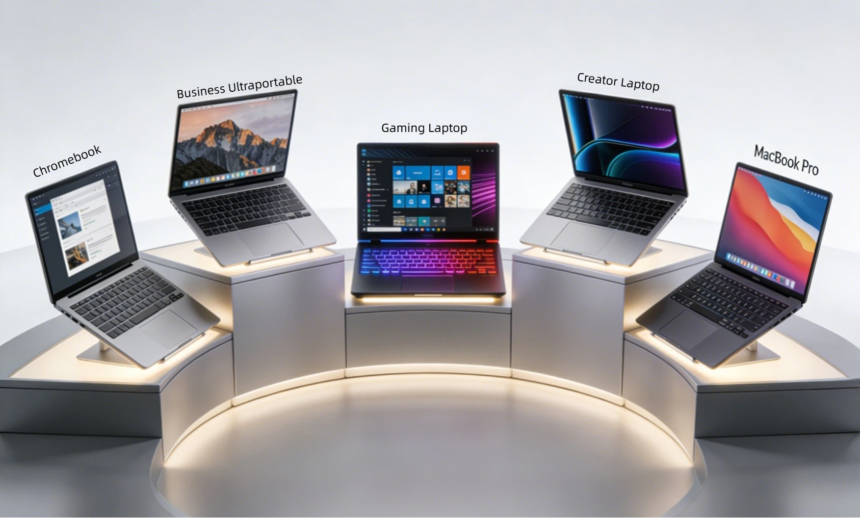
Instead of focusing only on brands, it’s better to understand categories of laptops.
1. Budget Laptops (For Basic Use)
These laptops are best for students who only need:
- Online classes
- Word documents
- Web browsing
They are affordable and simple but not suitable for heavy work.
2. Mid-Range Laptops (Best for Most Users)
These are the most popular choices for best laptops for students and work.
They offer:
- Good speed
- Smooth multitasking
- Long battery life
Perfect for students, teachers, office workers, and freelancers.
3. High-End Laptops (For Professionals)
These laptops are powerful and expensive. They are used for:
- Video editing
- Programming
- Graphic design
- Engineering software
They are fast but not necessary for basic users.
Operating System Choices
Your laptop experience also depends on the operating system.
Windows
Most popular and flexible. Works with almost all software.
macOS
Used in Apple laptops. Very smooth, secure, and great for creative work.
ChromeOS
Simple and lightweight. Best for online study and browsing.
For most students and workers, Windows is the best and most practical choice.
Best Laptop Brands to Consider
When searching for the best laptops for students and work, these brands are commonly trusted:
- Dell – Reliable and durable
- HP – Good for students and office users
- Lenovo – Known for keyboard comfort and performance
- Acer – Budget-friendly options
- Apple – Premium performance and design
Each brand has both low-cost and high-end models, so you can choose based on budget.
Tips for Choosing the Right Laptop
Here are some simple tips to help you make the right decision:
- Don’t buy based only on looks
- Always check RAM and SSD first
- Choose battery life over extra features
- Think about your future needs, not just today
- Compare at least 2–3 models before buying
A smart choice now can save you money and frustration later.
Final Thoughts
Finding the best laptops for students and work is about balancing performance, price, and purpose. You don’t always need the most expensive laptop. Instead, you need the one that fits your daily tasks.
If you are a student, an 8GB RAM laptop with SSD storage and good battery life is usually perfect. If you are a working professional or freelancer, you may need a more powerful machine depending on your work type.
Always remember: the best laptop is not the fastest one—it is the one that meets your needs comfortably and lasts for years.
FAQs
1. What is the best laptop for students on a budget?
A budget laptop with 8GB RAM, SSD storage, and an Intel i3 or Ryzen 3 processor is enough for most students.
2. Is 8GB RAM enough for study and work?
Yes, 8GB RAM is perfect for normal tasks like browsing, assignments, and office work. For heavy editing or programming, 16GB is better.
3. Which is better for students: SSD or HDD?
SSD is much better because it makes the laptop faster, smoother, and more responsive compared to HDD.
4. How long should a laptop battery last?
A good laptop should last at least 6 to 10 hours on a single charge for student and office use.
5. Do expensive laptops always perform better?
Not always. Some mid-range laptops perform very well and are perfect for students and office workers without spending too much money.